Send them your link
Invite them to a presentation that explains your service and answers the questions you hear most often.
 Sign in
 AUTOMATED PRESENTATIONS AND WEBINARS
Record a video and share a link. Your contacts sign up, watch your presentation and find the next step, without you having to be online for every session.
This is Laia Discovery Hub: a platform that handles registration, plays your video at the chosen time and shows you who took an interest.
€16 + VAT per month · Or €149 + VAT per year.
THE PROBLEM IT SOLVES
When you sell a service or introduce a product, much of the first conversation stays the same: what you do, how you help and how to get started.
Arranging another meeting, going through everything again and following up takes time you could spend answering specific questions or moving a client’s project forward.
Send your presentation first. Let that person explore your offer, then pick up the conversation with more context.
HERE IS WHAT THAT LOOKS LIKE
Imagine someone asks about your consulting service.
Invite them to a presentation that explains your service and answers the questions you hear most often.
They book a time, watch the video and find a button to schedule a call with you.
Check whether they attended, how much they watched and whether they clicked. You decide who to follow up with and how.
Illustrative example. You choose the content, the offer and the next step.
YOU SET IT UP, ONCE
Set everything up from your workspace in the app.
Paste a link to your recorded presentation on YouTube, Vimeo or an MP4 file. Customise the title, image and presenter.
Choose your session times. Decide when messages, your offer and a button to your booking page or website appear.
The app gives you a registration page. Share its link on your website, by email, on social media or directly with someone interested.
In every session, the video and offers follow the schedule you prepared. Attendees’ questions and contact activity stay in your dashboard for you to review.
TAKE A LOOK INSIDE
Explore these actual app screens to see how the pieces fit together.
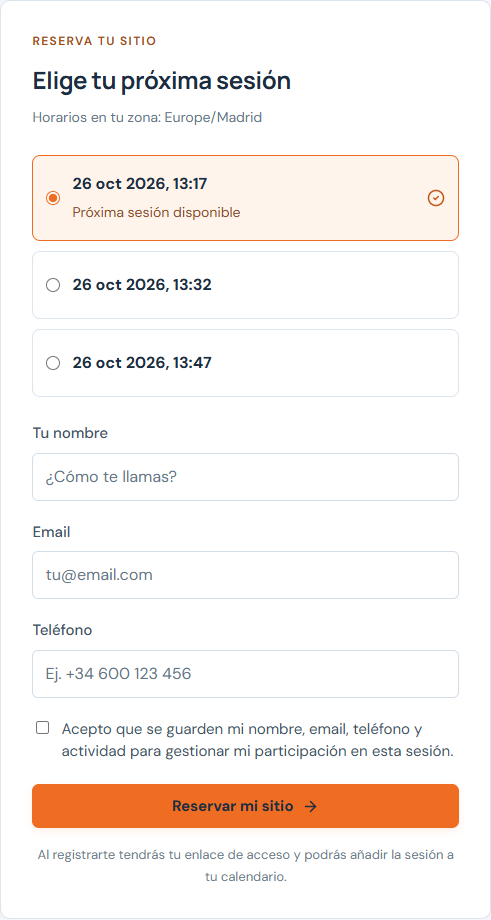
They open your link, find out what the presentation covers and book a time with their name and email. You can also ask for a phone number.
Actual app screens in Spanish, with a sample presentation and fictional contacts.
Your explanation is ready.
Your attention can move to the next step.
WAYS TO USE IT
Explain what you do and how you work before an introductory call.
Present a product or proposal and provide a link to request a demonstration.
Share an introductory lesson, then present your course, programme or service.
Registration, schedules, playback, scheduled messages and offers. It also brings your audience’s questions and activity together.
The video, your offer, the links and how to follow up with each contact. For email reminders, you connect your own Resend account.
CHOOSE HOW TO PAY
Both plans include the same features, unlimited webinars and unlimited use of the platform.
Annual billing saves €43 before VAT compared with twelve monthly payments.
€149+ VAT / year
Total: €180.29 per year, including 21% VAT.
Save €43 before VAT: 22.4% less than twelve monthly payments.
Create your account, then continue to secure payment through Stripe.
Renews annually. Cancel renewal and keep access for the period already paid for. Available to customers with a billing address in mainland Spain or the Balearic Islands. Read the terms of service (Spanish).
Video hosting and any external services you use are purchased separately.
Account setup and the workspace currently use Spanish.
BEFORE YOU START
What the platform does and what you need to put it to work.
Ask us on WhatsAppIt is an online platform for organising presentations and webinars. You provide a recorded video. Discovery Hub handles registration, session times, the viewing room, scheduled offers and information to help you follow up with your contacts.
A recorded presentation and a video link from YouTube, Vimeo or an MP4 file available over HTTPS. Choose your session times, set up your offer and share the registration link provided by the app.
For recorded webinars, the video follows each session’s schedule and offers appear at the times you set. You can review attendees’ questions and activity afterwards.
Each webinar has its own registration page in Discovery Hub. You can customise the title, description, presenter and image. Collect a name and email address, and optionally require a phone number.
Yes. Connect your own Resend account and configure confirmation emails and reminders for each webinar. You need to verify your sending domain and complete that connection first. Email service charges are separate.
You can see registrations, attendance, viewing time and offer clicks, combine filters and export your selection as a CSV. Available metrics depend on the video player. Viewing time is not available for Vimeo live streams.
Yes. You can embed a YouTube or Vimeo live stream in the room and schedule a specific date and time. You set up the broadcast with the video provider. Use recorded mode when you want the presentation to run automatically in repeated sessions.
Create an account, choose monthly or annual billing and pay through Stripe. Your workspace becomes available after payment is confirmed and you request an immediate start. Both plans renew automatically. You can cancel renewal from your account and keep access for the period already paid for. Subscriptions are currently available to customers with a billing address in mainland Spain or the Balearic Islands.
This service page is in English. The workspace, account registration and webinar pages currently use Spanish, as shown in the product screenshots. The linked legal documents are also provided in Spanish.
YOUR NEXT PRESENTATION
Turn your usual explanation into an experience your contacts can follow.